People have trusted word-of-mouth recommendations for as long as they've traded. Although the phrase "word of mouth" dates back to the Middle Ages, the habit it describes is far older. Reviews are word of mouth at scale. They tell new visitors that real people have bought from you, received their orders, and liked what arrived.
The challenge is that reviews rarely arrive on their own. Most happy customers simply move on with their day. So to build up social proof, you need a system that collects reviews consistently, ideally without you thinking about it.
This guide covers how to collect reviews from customers, the difference between product and store reviews, what to automate, how to benchmark review collection rate and how to do all of it for free.
Growth Unlocked: The Summit - Benchmarking your review collection rate talk wrap-up and checklists
At our annual summit we presented “Benchmarking: Is your review collection rate actually good?” , featuring Martin, our Head of Design and Product Reviews and Cameron, our Data Analyst. Over the next few weeks we're putting together the checklists and resource lists from the session - everything will be published on our blog. Stay tuned.
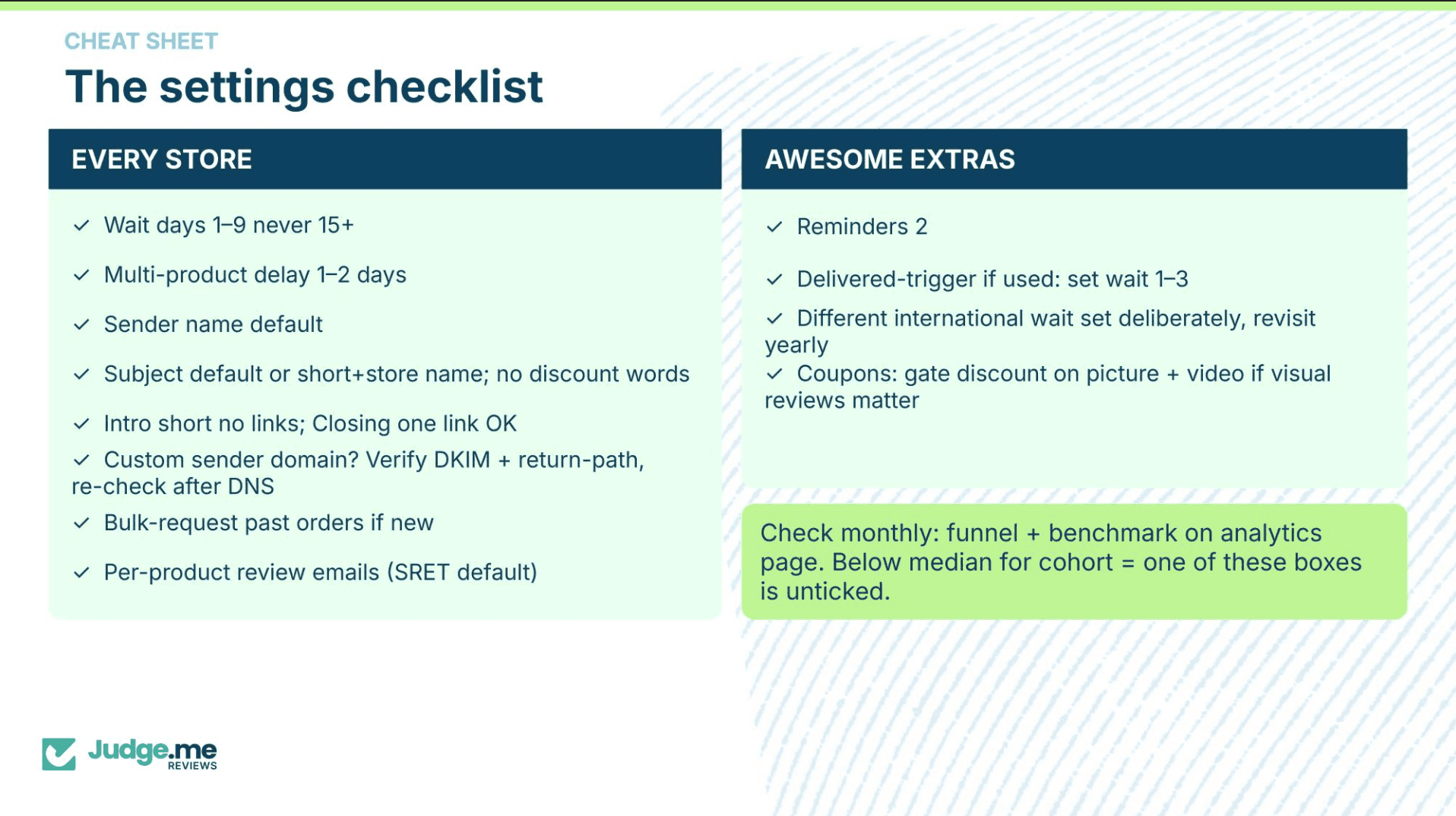
For now, you can find Cameron’s review collection rate benchmarking cheat sheet below:
Why reviews matter for a new Shopify store
When your store is new, you're asking strangers to trust you with their money based on very little information. Reviews make that case for you by:
Answering buying questions. Shoppers often use reviews to check sizing, quality, and whether the product matches the photos. In practice: a detailed review can resolve the doubt that's stopping a prospective buyer from checking out.
Giving you feedback. Reviews are free market research. They tell you what customers love and where you're falling short. That's especially useful in your early years of trading or when launching new products.
Support your store’s visibility in search. Review content adds fresh, relevant content to your product pages. Plus, star ratings can appear alongside your listings in Google when you add the right structured data.
The sooner you start collecting reviews, the sooner they compound. A store with a steady flow of recent, genuine reviews looks active and trustworthy. A handful of old reviews can quietly signal the opposite.
Product reviews vs store reviews: what's the difference?
Product reviews are about a specific item: how it fits, how it works, whether it lasted. They sit on your product pages and help shoppers decide between items.
Store reviews (sometimes called shop or site reviews) are about the overall experience: delivery speed, packaging, customer service. They build trust in your business as a whole and work well on your homepage, in ads, and on a dedicated reviews page.
A solid review strategy collects both. When you ask customers for feedback after a purchase, you can invite them to rate the product they bought and their experience with your store in the same request.
How to collect reviews from customers - 7 strategies that work
Here are seven methods that work. None of them are secrets, but done consistently they're what separates stores with hundreds of reviews from stores with a handful:
1. Send automated review request emails
This is the single most effective way to collect product reviews. After a customer receives their order, an email lands in their inbox asking how they got on. They rate the product, write a few words, maybe add a photo, and you have a review.
The reason automation matters is consistency. Manual requests work until life gets in the way. One busy week and the emails stop going out, the backlog grows, and catching up starts to feel like a project. Automation takes that off your plate. An automated flow asks every customer, every time, which is how stores build hundreds of reviews without much ongoing effort. If you've wondered how to collect product reviews automatically, this is it: a review app watches your orders and sends the request for you.
How to schedule automatic review request emails with Judge.me →
2. Get your review request timing right
Timing matters too. Request a review too early and the order hasn't arrived, or the customer hasn't used the product yet. Too late, and the excitement has faded. Our benchmarking data puts the sweet spot at 1 to 9 days after fulfillment, with requests sent 15 or more days out seeing a significant drop-off in response. The right delay is delivery time plus enough time to try the product, so set it per product where you can: quicker for things people use straight away, longer for products like supplements that need weeks to show results.
3. Don’t be afraid to send reminder emails
Most reviews you don't get aren't refusals. The customer meant to, then the email slipped down the inbox. A follow-up reminder recovers a share of those reviews at no extra effort, and it works even when the first email went unopened, since an unopened request usually means bad timing rather than no interest.
During the benchmarking talk at Growth Unlocked: The Summit, our product team recommended setting up two reminders, spaced out so they read as a nudge rather than a chase. If you missed it, a wrap-up guide and full recording are coming soon.
How to set up automatic review request email reminders with Judge.me →
4. Ask directly after good service moments
Timing isn't only about delays and schedules. If a customer emails to say they love their order, or you've just resolved a support query well, that's a natural moment to ask for a review. A short, personal reply ("So glad you're happy with it! If you have a minute, a review would mean a lot") tends to land well because the goodwill is already there.
5. Ask for photos and videos
A photo review gives you two things at once: the review itself, and user-generated content you can feature on product pages and social media. Shoppers trust photos from other customers because they show the product in real life, rather than in a brand-curated studio shot. Most review apps let you request photos in the review form. You can also tier incentives by review type, so customers who go to the effort of leaving a photo or video review receive a discount, or a bigger one, on their next purchase.
Explore Judge.me’s widgets including UGC media grid, video carousel & UGC Instagram shopping →
6. Add review requests to your packaging and receipts
If you've come from a brick-and-mortar background, this one will feel familiar. A small card in the parcel, or a line on the receipt, inviting customers to leave a review works as a physical reminder that arrives at the perfect moment: when the customer is holding the product. A QR code linking straight to your review form removes the typing. At our recent Growth Unlocked Summit, some merchants told us handwritten notes from the founder had worked well for them. It's a small gesture that reads as genuinely personal.
7. Use incentives carefully
Offering a discount on a future order in exchange for a review is fine, and it encourages repeat purchases at the same time. Where it goes wrong is rewarding only positive reviews, or filtering out negative ones before they publish, a practice known as review gating. Removing genuine spam or abuse is fair game. But it's worth letting honest criticism stand: mixed feedback reads as more credible to shoppers than a wall of identical five-star ratings, and a considered reply to a critical review often does more for trust than the review took away. Ask everyone, reward everyone equally, and let the reviews speak for themselves.
Our feedback playbook goes further on this, including the loyalty apps we integrate with so customers earn points for reviewing, plus collecting reviews over WhatsApp and SMS.
Learn more about our playbooks →
How to collect reviews on Shopify
Shopify doesn't include built-in review collection, so you'll need a review app from the Shopify App Store. Here's what setup looks like in practice:
Install a review app. Judge.me installs in a few clicks and is used by 756,000+ stores worldwide.
Turn on automated review requests. Set your send delay (days after fulfillment or delivery) and our app handles the rest for every order, including past orders if you want to backfill. Read more about sending review request emails for past orders.
Customise your request email. Match your brand voice, keep the subject line short, and make the ask clear. One request, or CTA, per email works better than a list of demands.
Add review widgets to your store. Display reviews across your site and directly on product pages so shoppers can find and read reviews without hunting for them.
Enable store reviews alongside product reviews. Building trust in your business, not just individual product items.
Get certified. The Judge.me Trust Badge shows shoppers your Trust Score and verified purchase reviews. Stores that meet four published standards, from transparent review practices to clear shipping and refund policies, also earn Trust Certification. The check comes from Judge.me rather than from you, giving first-time visitors a neutral party's word that your store is run well.
Once this is set up, reviews come in on their own. The only thing left to do is reply as they arrive, and get back to growing your store.
How to collect reviews from customers free
You don't need a budget to start. Judge.me's free plan includes unlimited review request emails and unlimited orders, so you can collect reviews from every customer from day one without hitting a cap. Photo and video requests, review widgets, and star ratings are included too.
That "unlimited" matters more than it might seem. Many review tools cap the number of monthly requests on their free tiers, which quietly limits how fast your social proof can grow just as your store starts gaining momentum.
Beyond the app itself, the free methods above (packaging inserts, direct asks, social prompts) cost nothing but a little setup time.
Check out the difference between our Forever Free and Awesome plans →
What to do with reviews once you have them
Collecting is half the job. To get the full value:
Display reviews prominently. Product page reviews, homepage carousels, and a dedicated reviews page all help shoppers find social proof wherever they land.
Add star ratings to your Google results. Review apps can add structured data to your pages so ratings appear in search listings, which helps your results stand out. Discover how to enable with Judge.me.
Reply to reviews, especially negative ones. A calm, helpful reply to criticism shows every future shopper how you handle problems. We've covered this in detail in our guide to responding to negative reviews.
Reuse reviews in marketing. Quote them in ads, share photo reviews on social media, and drop them into email campaigns.
Start collecting reviews today
The best time to start collecting reviews was your first order; the second best time is now. Set up automated review requests, make it easy for customers to respond, and display what comes back where shoppers can see it. Within a few months, you'll have a bank of social proof doing the selling for you.
FAQs
Your questions on how to collect reviews, answered.
How long after a purchase should I ask for a review?
Between 1-9 days after delivery is a good reference point. It gives your customer time to open the parcel and try the product while the purchase is still fresh in their mind. For products that take longer to evaluate, like skincare or supplements, extend the delay so the customer has something meaningful to say. Judge.me allows you to set per product review requests so you can customize and tailor your timing.
Should I offer rewards for reviews?
Yes, if the reward is offered to everyone equally regardless of what they write. A small discount on a future order works well and encourages repeat purchases at the same time. Never reward only positive reviews and try not to filter out negative ones before they're published, a practice known as review gating. It undermines trust.
How do I handle negative reviews?
Reply calmly, helpfully and most importantly, objectively. A negative review is rarely as damaging as it feels in the moment, and future shoppers may judge you more on your response than on the review itself. A considered reply shows you take feedback seriously and handle problems well. Check out our guide to responding to negative reviews on our blog to learn more.
What's the difference between a product review and a store review?
Product reviews cover the item itself: how it fits, how it works and whether it matches the description. Store reviews cover the buying experience, from delivery speed to customer service. You should collect both, since product reviews help shoppers choose between items while store reviews build trust in your business as a whole.
How do I get more photo and video reviews?
Ask for them directly in your review request form and offer a small incentive, applied equally to every customer who adds one. Photos and videos are worth encouraging because they show the product in real life rather than in a studio, which makes them some of the most persuasive content on your product pages.
Can reviews help my Shopify store's SEO?
Yes. Every review adds fresh, relevant text to your product pages, which search engines favour. Adding structured data also makes your star ratings eligible to appear alongside your listings in Google search results, helping them stand out and attract clicks.