Products
product
Product reviews
Collect reviews to boost trust
Store reviews
Highlight your store's trust
explore judge.me
Features
Tools to grow with confidence
Widgets
Display reviews your way
Integrations
Connect to 100+ apps
🎉 Unboxed
Discover latest features
Why Judge.me
Why Judge.me
Flat pricing
Affordable, flat pricing
Customer support
24/7 expert support, 5* rated
Security
Enterprise-grade security
Integrations
Connect to 100+ apps
trust ecosystem
Trust manifesto
Be part of something bigger
Medals
Earn medals and grow trust
Our customers
Why stores worldwide trust us
judge.me for
Dropshippers
Build trust with reviews
Starting e-commerce
Drive first sales with reviews
Growing e-commerce
Scale with reviews on your side
partners
Become a tech partner
Integrate with Judge.me
Become an agency partner
Join our agency network
Resources
RESOURCES
Blog
Growth tips and more
Events
Explore online & live events
Agencies
Find agencies to help you grow
Success stories
Real results from real customers
Support
Help center
Your go-to support hub
API for devs
Explore our API docs
Products
product
explore judge.me
Why Judge.me
Why Judge.me
trust ecosystem
Why Judge.me
Why Judge.me
trust ecosystem
Resources
RESOURCES
Support
Products
product
explore judge.me
Why Judge.me
Why Judge.me
trust ecosystem
Why Judge.me
Why Judge.me
trust ecosystem
Resources
RESOURCES
Support
Products
product
Product reviews
Collect reviews to boost trust
Store reviews
Highlight your store's trust
explore judge.me
Features
Tools to grow with confidence
Widgets
Display reviews your way
Integrations
Connect to 100+ apps
🎉 Unboxed
Discover latest features
Why Judge.me
Why Judge.me
Flat pricing
Affordable, flat pricing
Customer support
24/7 expert support, 5* rated
Security
Enterprise-grade security
Integrations
Connect to 100+ apps
trust ecosystem
Trust manifesto
Be part of something bigger
Medals
Earn medals and grow trust
Our customers
Why stores worldwide trust us
judge.me for
Dropshippers
Build trust with reviews
Starting e-commerce
Drive first sales with reviews
Growing e-commerce
Scale with reviews on your side
partners
Become a tech partner
Integrate with Judge.me
Become an agency partner
Join our agency network
Resources
RESOURCES
Blog
Growth tips and more
Events
Explore online & live events
Agencies
Find agencies to help you grow
Success stories
Real results from real customers
Support
Help center
Your go-to support hub
API for devs
Explore our API docs
Table of contents
Section
Section
Reviews
Reviews
Reviews
Create Review Cards To Showcase Your Products And User-generated Content

Published on: Jul 22, 2021
Updated on: Feb 20, 2025


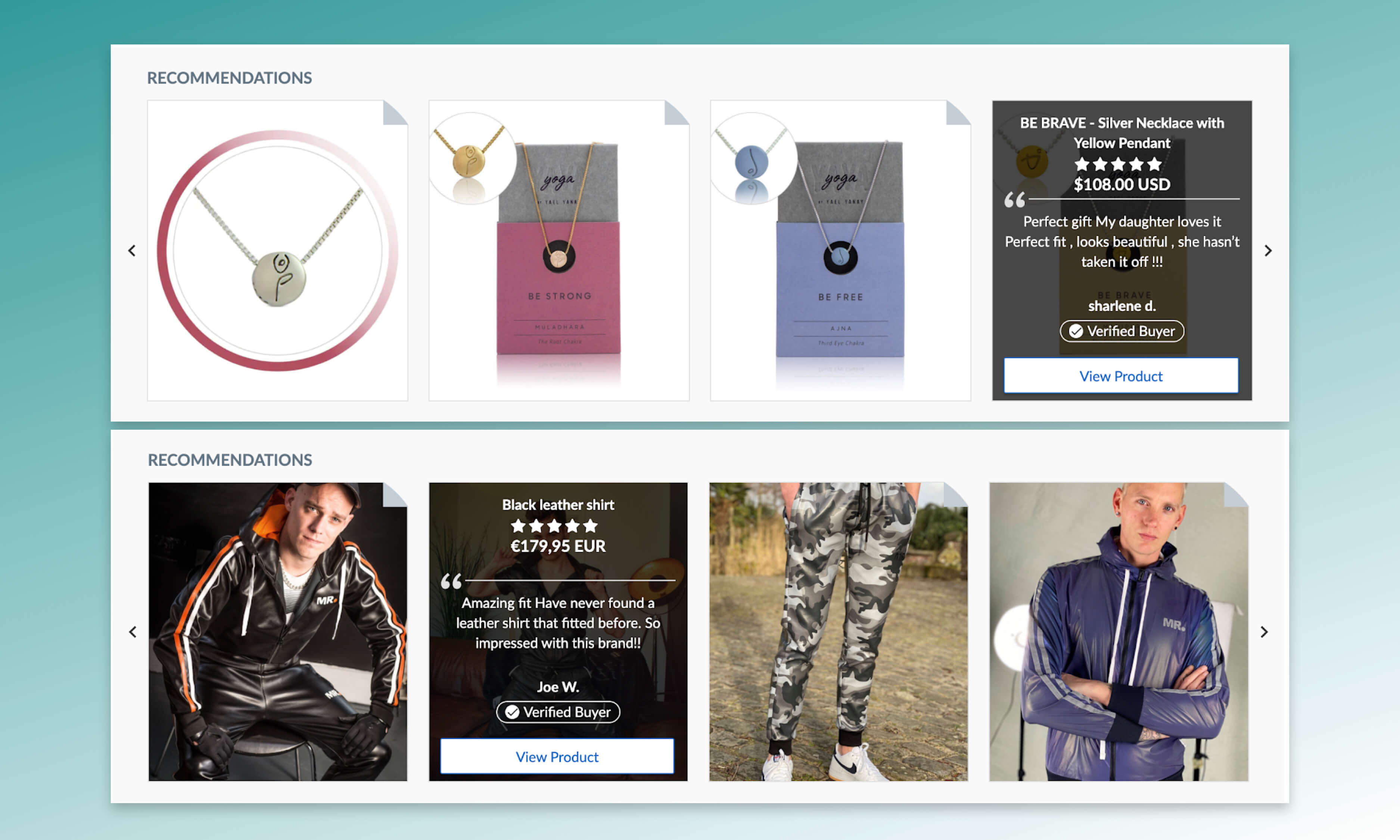
Do you have compelling reviews and photos from your buyers? Review cards are the best place to highlight this user-generated content on the Judge.me review site. In each review card, you can include a review quote, star rating, product information, and a Call-to-Action (CTA) button linked to a product page. In this article, we’ll share two ways to create better review cards.
1. Find good reviews to feature in the review cards
The review cards are designed with a focus on your product images or customer review photos, so make sure to choose your best ones! In particular, we recommend creating review cards with photos of your products taken by past customers (if you have them) over stock product images. Having photos of people using your products in real life comes across as more genuine and make potential buyers more confident in their purchases.
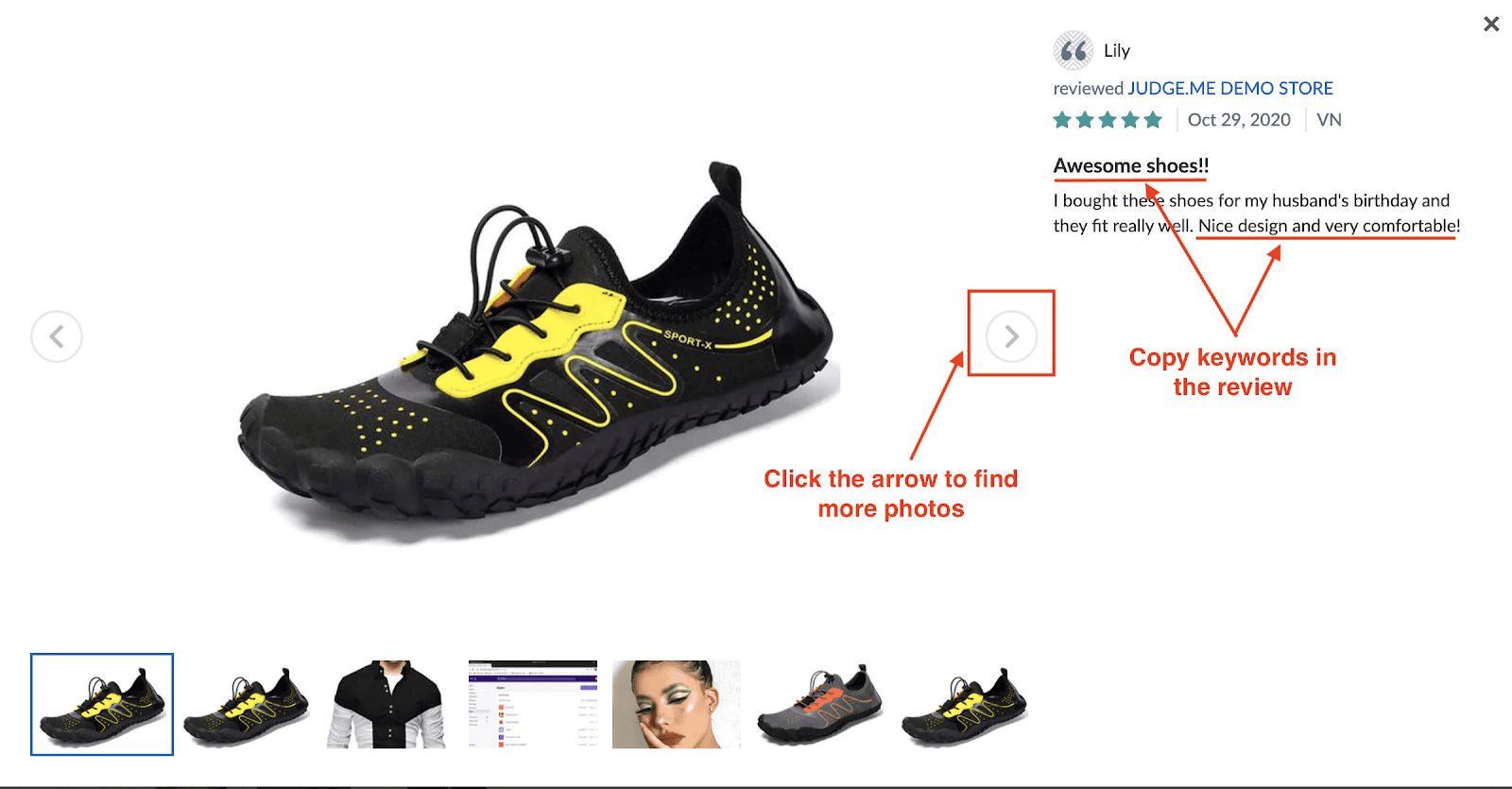
One shortcut is to check the “Customer photos” section on the bottom left side of your store page.

From there, you can see all your review photos (if you are on Judge.me’s Awesome plan and enable the Reviews Photos/Videos). You can click on the left and right arrow to find the photos you like.
Once you have scrolled through the photos and found your best reviews, you can copy some keywords from your selected review such as “awesome shoes!” or “nice design and very comfortable”.
Then, go to your review cards settings and create a new card.

In the search box, paste the keywords you just copied from the reviews, press Enter/Return and you’ll see a list of reviews including these keywords. Choose the reviews you want, click Select and Continue, then finish other steps to create your beautiful review cards.

2. Review card vs. Product card: which one is better?
Our review cards come in two styles: review card and product card. You may ask: which one is better for me? The answer is: it depends on which parts of the reviews you’d like to emphasize.
A review card gives you a large space to feature a review quote, so this style is ideal if you want to display a long and informative review.

You might be interested in
Everything you need to grow your store, all in one place
Why Judge.me
Platforms
For consumers
For security researchers
Company Registration Number: 12157706
Buckworths 2nd Floor, 1-3 Worship Street, London, England, EC2A 2AB
Copyright 2025 Judge.me Reviews
Why Judge.me
Platforms
For consumers
For security researchers
Company Registration Number: 12157706
Buckworths 2nd Floor, 1-3 Worship Street, London, England, EC2A 2AB
Copyright 2025 Judge.me Reviews
Why Judge.me
Platforms
For consumers
For security researchers
Company Registration Number: 12157706
Buckworths 2nd Floor, 1-3 Worship Street, London, England, EC2A 2AB
Copyright 2025 Judge.me Reviews
Why Judge.me
Platforms
For consumers
For security researchers
Company Registration Number: 12157706
Buckworths 2nd Floor, 1-3 Worship Street,
London, England, EC2A 2AB
Copyright 2025 Judge.me Reviews