Products
product
Product reviews
Collect reviews to boost trust
Store reviews
Highlight your store's trust
explore judge.me
Features
Tools to grow with confidence
Widgets
Display reviews your way
Integrations
Connect to 100+ apps
🎉 Unboxed
Discover latest features
Why Judge.me
Why Judge.me
Flat pricing
Affordable, flat pricing
Customer support
24/7 expert support, 5* rated
Security
Enterprise-grade security
Integrations
Connect to 100+ apps
trust ecosystem
Trust manifesto
Be part of something bigger
Medals
Earn medals and grow trust
Our customers
Why stores worldwide trust us
judge.me for
Dropshippers
Build trust with reviews
Starting e-commerce
Drive first sales with reviews
Growing e-commerce
Scale with reviews on your side
partners
Become a tech partner
Integrate with Judge.me
Become an agency partner
Join our agency network
Resources
RESOURCES
Blog
Growth tips and more
Events
Explore online & live events
Agencies
Find agencies to help you grow
Success stories
Real results from real customers
Support
Help center
Your go-to support hub
API for devs
Explore our API docs
Products
product
explore judge.me
Why Judge.me
Why Judge.me
trust ecosystem
Why Judge.me
Why Judge.me
trust ecosystem
Resources
RESOURCES
Support
Products
product
explore judge.me
Why Judge.me
Why Judge.me
trust ecosystem
Why Judge.me
Why Judge.me
trust ecosystem
Resources
RESOURCES
Support
Products
product
Product reviews
Collect reviews to boost trust
Store reviews
Highlight your store's trust
explore judge.me
Features
Tools to grow with confidence
Widgets
Display reviews your way
Integrations
Connect to 100+ apps
🎉 Unboxed
Discover latest features
Why Judge.me
Why Judge.me
Flat pricing
Affordable, flat pricing
Customer support
24/7 expert support, 5* rated
Security
Enterprise-grade security
Integrations
Connect to 100+ apps
trust ecosystem
Trust manifesto
Be part of something bigger
Medals
Earn medals and grow trust
Our customers
Why stores worldwide trust us
judge.me for
Dropshippers
Build trust with reviews
Starting e-commerce
Drive first sales with reviews
Growing e-commerce
Scale with reviews on your side
partners
Become a tech partner
Integrate with Judge.me
Become an agency partner
Join our agency network
Resources
RESOURCES
Blog
Growth tips and more
Events
Explore online & live events
Agencies
Find agencies to help you grow
Success stories
Real results from real customers
Support
Help center
Your go-to support hub
API for devs
Explore our API docs
Table of contents
Section
Section
Features
Features
Features
Media Grid: Display a Gallery of Review Photos and Videos in the Widgets

Published on: Jan 6, 2022
Updated on: Feb 20, 2025


62% of consumers said that they were more likely to buy a product if seeing customer photos and videos, according to a survey from Bazaarvoice. Photos and videos let customers visualize your product easier and decide if it is the right one for them. More photos and videos, together with positive reviews, prove the quality of your products and add more social proof to your store.
Hence, it's crucial to make your photos and videos more noticeable to potential customers. Our Widget Media Grid can help you do that. In this article, we'll introduce more about this cool feature.
What does the Widget Media Grid look like?
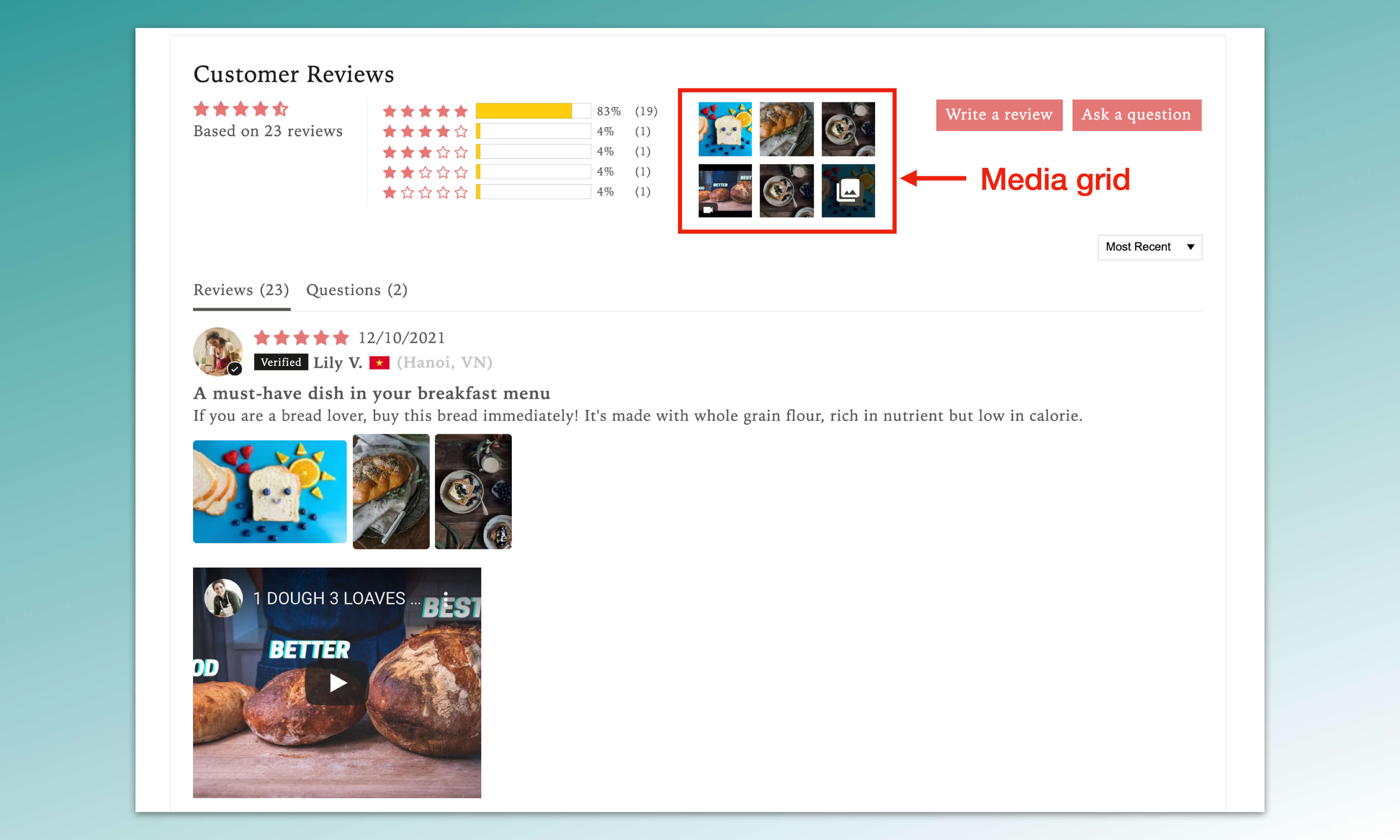
Widget Media Grid is a dedicated section that aggregates all the review photos and videos you have received. When enabled, the media grid will be added to the Review Widget, the All Reviews Page, and the Floating Reviews Tab. By displaying your photos and videos on top of your widgets, the media grid lets your customer see all the visuals without scrolling down all reviews below.

The grid will show the most recent review photos and videos. When you click on the grid, a pop-up will open with the review photo/video and the review content associated with it. You can click on the arrow icon, or other photos/videos in the gallery to see other reviews.

How to enable the Widget Media Grid?
Widget Media Grid is available on both our Free and Awesome plans. Follow these steps to enable this feature:
From Judge.me home dashboard, go to Settings > Review Widget > Widget Media Grid
Toggle the bar to the right to enable the feature.
Click Save settings.


You might be interested in
Everything you need to grow your store, all in one place
Why Judge.me
Platforms
For consumers
For security researchers
Company Registration Number: 12157706
Buckworths 2nd Floor, 1-3 Worship Street, London, England, EC2A 2AB
Copyright 2025 Judge.me Reviews
Why Judge.me
Platforms
For consumers
For security researchers
Company Registration Number: 12157706
Buckworths 2nd Floor, 1-3 Worship Street, London, England, EC2A 2AB
Copyright 2025 Judge.me Reviews
Why Judge.me
Platforms
For consumers
For security researchers
Company Registration Number: 12157706
Buckworths 2nd Floor, 1-3 Worship Street, London, England, EC2A 2AB
Copyright 2025 Judge.me Reviews
Why Judge.me
Platforms
For consumers
For security researchers
Company Registration Number: 12157706
Buckworths 2nd Floor, 1-3 Worship Street,
London, England, EC2A 2AB
Copyright 2025 Judge.me Reviews