Products
product
Product reviews
Collect reviews to boost trust
Store reviews
Highlight your store's trust
explore judge.me
Features
Tools to grow with confidence
Widgets
Display reviews your way
Integrations
Connect to 100+ apps
🎉 Unboxed
Discover latest features
Why Judge.me
Why Judge.me
Flat pricing
Affordable, flat pricing
Customer support
24/7 expert support, 5* rated
Security
Enterprise-grade security
Integrations
Connect to 100+ apps
trust ecosystem
Trust manifesto
Be part of something bigger
Medals
Earn medals and grow trust
Our customers
Why stores worldwide trust us
judge.me for
Dropshippers
Build trust with reviews
Starting e-commerce
Drive first sales with reviews
Growing e-commerce
Scale with reviews on your side
partners
Become a tech partner
Integrate with Judge.me
Become an agency partner
Join our agency network
Resources
RESOURCES
Blog
Growth tips and more
Events
Explore online & live events
Agencies
Find agencies to help you grow
Success stories
Real results from real customers
Support
Help center
Your go-to support hub
API for devs
Explore our API docs
Products
product
explore judge.me
Why Judge.me
Why Judge.me
trust ecosystem
Why Judge.me
Why Judge.me
trust ecosystem
Resources
RESOURCES
Support
Products
product
explore judge.me
Why Judge.me
Why Judge.me
trust ecosystem
Why Judge.me
Why Judge.me
trust ecosystem
Resources
RESOURCES
Support
Products
product
Product reviews
Collect reviews to boost trust
Store reviews
Highlight your store's trust
explore judge.me
Features
Tools to grow with confidence
Widgets
Display reviews your way
Integrations
Connect to 100+ apps
🎉 Unboxed
Discover latest features
Why Judge.me
Why Judge.me
Flat pricing
Affordable, flat pricing
Customer support
24/7 expert support, 5* rated
Security
Enterprise-grade security
Integrations
Connect to 100+ apps
trust ecosystem
Trust manifesto
Be part of something bigger
Medals
Earn medals and grow trust
Our customers
Why stores worldwide trust us
judge.me for
Dropshippers
Build trust with reviews
Starting e-commerce
Drive first sales with reviews
Growing e-commerce
Scale with reviews on your side
partners
Become a tech partner
Integrate with Judge.me
Become an agency partner
Join our agency network
Resources
RESOURCES
Blog
Growth tips and more
Events
Explore online & live events
Agencies
Find agencies to help you grow
Success stories
Real results from real customers
Support
Help center
Your go-to support hub
API for devs
Explore our API docs
Table of contents
Section
Section
Features
Features
Features
Automate Tasks with Shopify Flow
Published on: Jan 26, 2024
Updated on: Oct 16, 2025


Why try and do everything if you don’t have to?
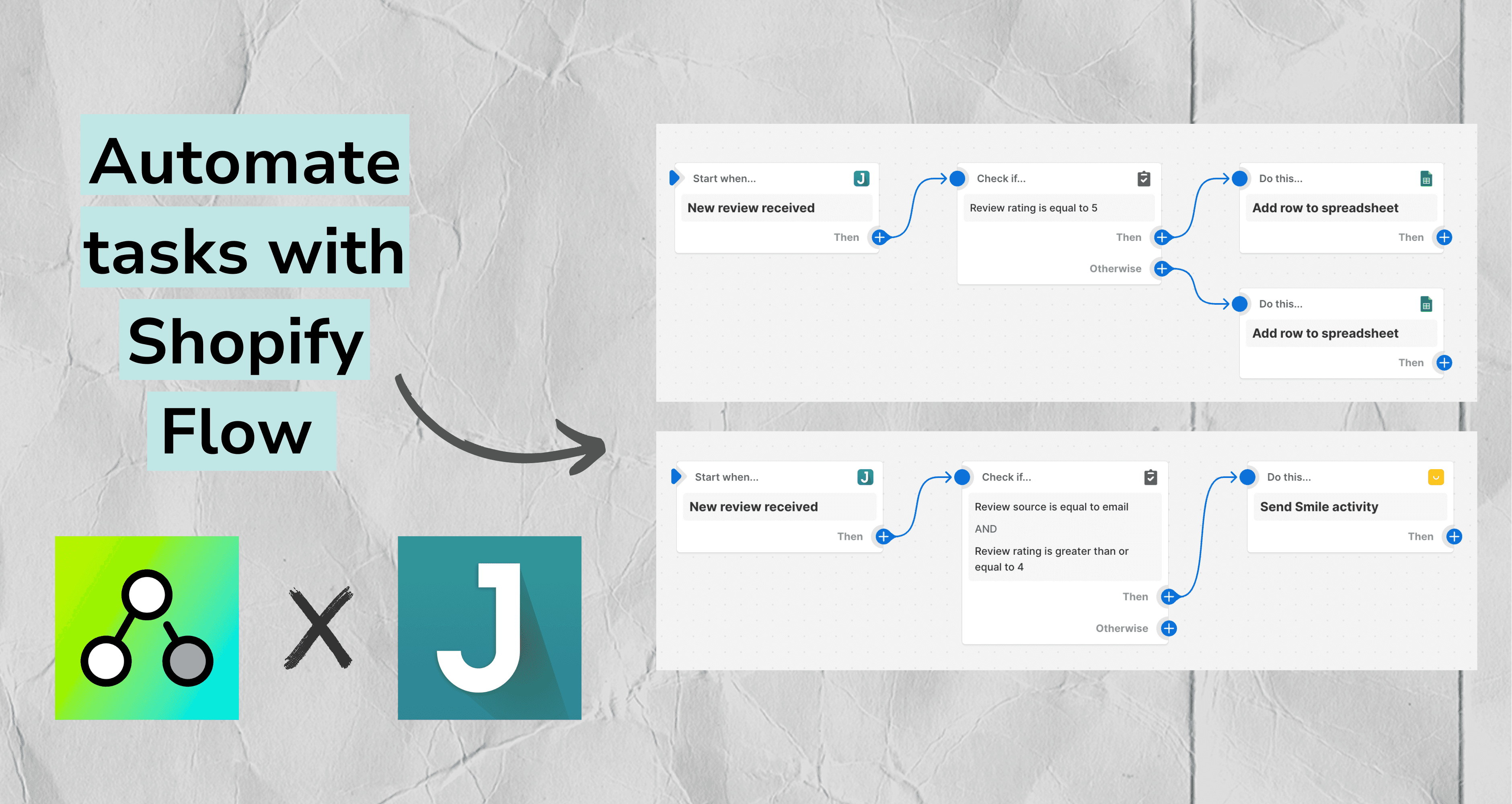
With Shopify Flow, you can automate tasks and processes across your store and apps. That means you have more time and energy to devote to the things that matter most to you.
With our new integration, you can send or skip a review request in Judge.me when an order is fulfilled. Or can also use it to trigger a follow-up action, such as sending an email, when a new review is submitted in Judge.me.
Let’s take a closer look.
Three ways to use it
There are many ways you can use Shopify Flow to make your life easier.
Record positive and negative reviews in different spreadsheets
You can use Shopify Flow to record your good and bad reviews in separate Google spreadsheets. By selecting the review rating condition, you can tell Shopify Flow to send the data from each new review to a spreadsheet of your choosing.

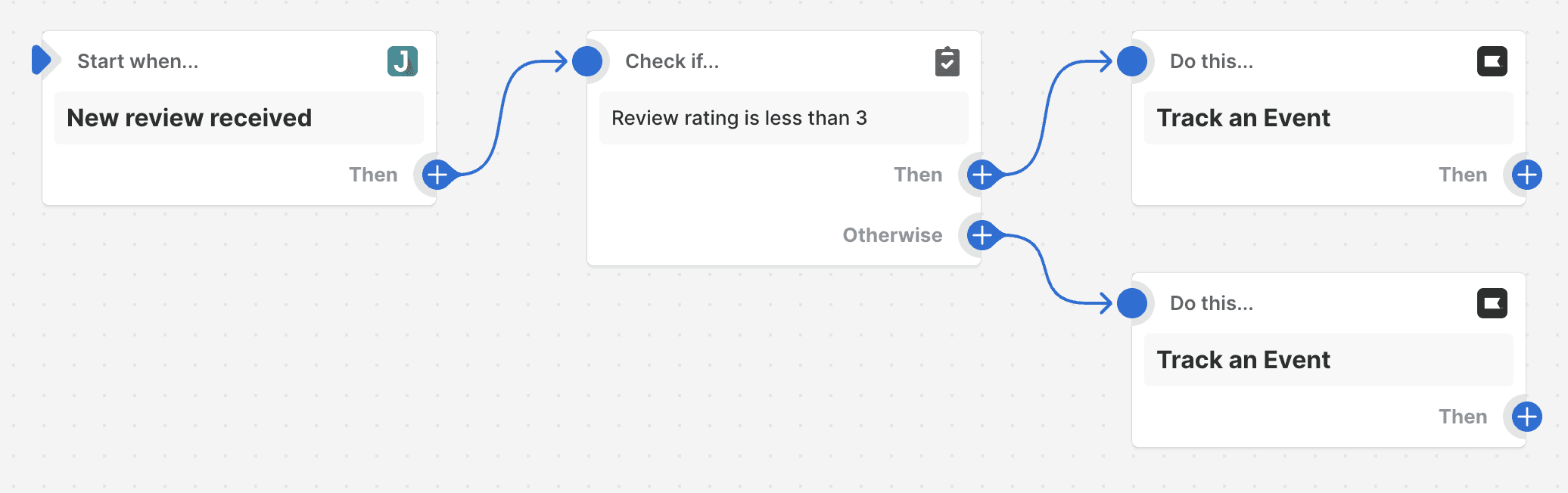
Send follow-up emails via Klaviyo
Tell Shopify flow to send an event to Klaviyo whenever one of your customers leave a review via Judge.me.
That event can then trigger a follow-up email to send to that customers. You can choose to send different emails for different events based on the rating your customer gives you.
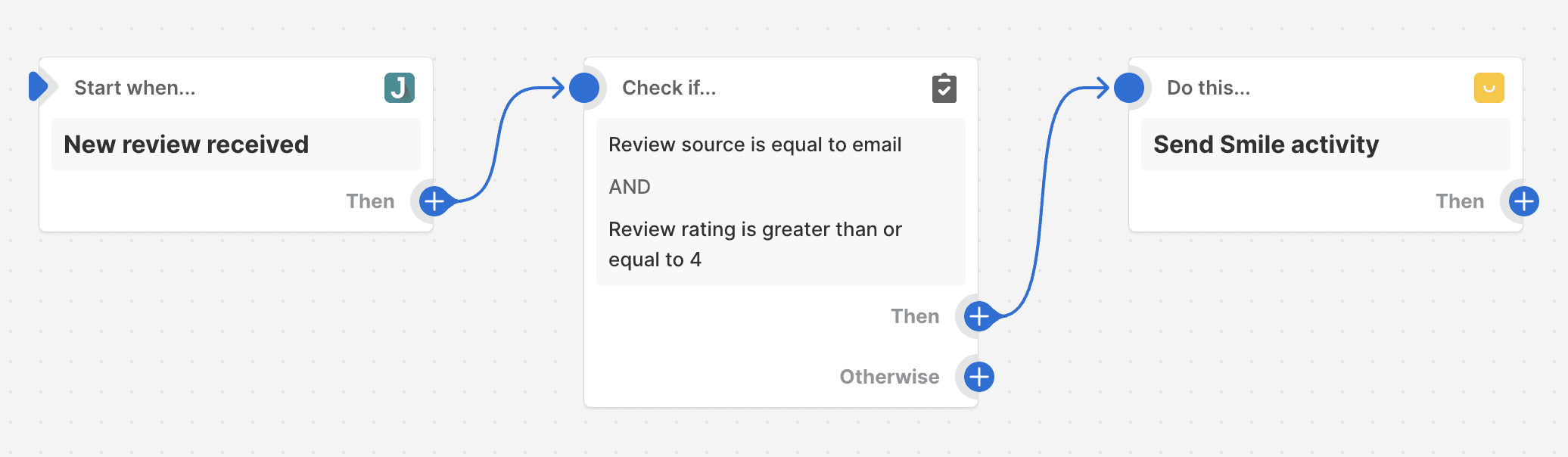
Reward reviewers via Smile.io
When a buyer leaves you a review, Shopify Flow can send an event to loyalty app Smile.io. Smile.io can then use the event to send a reward to that buyer.
You can tweak the settings so that rewards are sent according to the review rating, review source, or something else.
How to set it up
Ready to get going?
From your Judge.me admin, go to General Settings > Integrations > Admin Backend.
Enable the Shopify Flow integration and click Save.
Then, from your Shopify Flow admin, click Create workflow.
Select the trigger, condition, and action you want.
Once done, click Turn on workflow.
Enjoy!
Having trouble? Read the KB article here. Or, get in touch with us at support@judge.me.
You might be interested in
Everything you need to grow your store, all in one place
Why Judge.me
Platforms
For consumers
For security researchers
Company Registration Number: 12157706
Buckworths 2nd Floor, 1-3 Worship Street, London, England, EC2A 2AB
Copyright 2025 Judge.me Reviews
Why Judge.me
Platforms
For consumers
For security researchers
Company Registration Number: 12157706
Buckworths 2nd Floor, 1-3 Worship Street, London, England, EC2A 2AB
Copyright 2025 Judge.me Reviews
Why Judge.me
Platforms
For consumers
For security researchers
Company Registration Number: 12157706
Buckworths 2nd Floor, 1-3 Worship Street, London, England, EC2A 2AB
Copyright 2025 Judge.me Reviews
Why Judge.me
Platforms
For consumers
For security researchers
Company Registration Number: 12157706
Buckworths 2nd Floor, 1-3 Worship Street,
London, England, EC2A 2AB
Copyright 2025 Judge.me Reviews