Products
product
Product reviews
Collect reviews to boost trust
Store reviews
Highlight your store's trust
explore judge.me
Features
Tools to grow with confidence
Widgets
Display reviews your way
Integrations
Connect to 100+ apps
🎉 Unboxed
Discover latest features
Why Judge.me
Why Judge.me
Flat pricing
Affordable, flat pricing
Customer support
24/7 expert support, 5* rated
Security
Enterprise-grade security
Integrations
Connect to 100+ apps
trust ecosystem
Trust manifesto
Be part of something bigger
Medals
Earn medals and grow trust
Our customers
Why stores worldwide trust us
judge.me for
Dropshippers
Build trust with reviews
Starting e-commerce
Drive first sales with reviews
Growing e-commerce
Scale with reviews on your side
partners
Become a tech partner
Integrate with Judge.me
Become an agency partner
Join our agency network
Resources
RESOURCES
Blog
Growth tips and more
Events
Explore online & live events
Agencies
Find agencies to help you grow
Success stories
Real results from real customers
Support
Help center
Your go-to support hub
API for devs
Explore our API docs
Products
product
explore judge.me
Why Judge.me
Why Judge.me
trust ecosystem
Why Judge.me
Why Judge.me
trust ecosystem
Resources
RESOURCES
Support
Products
product
explore judge.me
Why Judge.me
Why Judge.me
trust ecosystem
Why Judge.me
Why Judge.me
trust ecosystem
Resources
RESOURCES
Support
Products
product
Product reviews
Collect reviews to boost trust
Store reviews
Highlight your store's trust
explore judge.me
Features
Tools to grow with confidence
Widgets
Display reviews your way
Integrations
Connect to 100+ apps
🎉 Unboxed
Discover latest features
Why Judge.me
Why Judge.me
Flat pricing
Affordable, flat pricing
Customer support
24/7 expert support, 5* rated
Security
Enterprise-grade security
Integrations
Connect to 100+ apps
trust ecosystem
Trust manifesto
Be part of something bigger
Medals
Earn medals and grow trust
Our customers
Why stores worldwide trust us
judge.me for
Dropshippers
Build trust with reviews
Starting e-commerce
Drive first sales with reviews
Growing e-commerce
Scale with reviews on your side
partners
Become a tech partner
Integrate with Judge.me
Become an agency partner
Join our agency network
Resources
RESOURCES
Blog
Growth tips and more
Events
Explore online & live events
Agencies
Find agencies to help you grow
Success stories
Real results from real customers
Support
Help center
Your go-to support hub
API for devs
Explore our API docs
Table of contents
Section
Section
Features
Features
Features
Asking Your Customers to Update Their Reviews: When and How
Published on: Oct 16, 2020
Updated on: Feb 20, 2025


Asking your customers to update their reviews can be a tricky task, but if done well, can benefit you in many ways. In this article, we’ll discuss:
1- When you should ask for a review update
1.1. After you have addressed the concerns in a negative reviews
Negative reviews are inevitable in any business. For example, a customer might give you a 1-star review if the product she received was broken. In this case, if you have completely resolved her issue (e.g. send her a new product), you can politely ask her to update the existing reviews and describe her experience with the product.
1.2. You’ve just enabled photo/video reviews or custom questions.
Real photos and videos make it easier for reviewers to share their experiences, and help potential buyers to assess your products easier. Meanwhile, custom questions let you collect additional feedback beyond product reviews to understand more about your customers. You can ask for a review update so your reviewers add photos/videos or answer your extra questions.
1.3. Reviewers repurchase a different variant of the same product.
Imagine that you are an online store selling skincare, and your new toner product comes in two bottle styles: bump and sprayer. A customer has already given a review on the bump bottle she bought, then comes back and buys a sprayer. In this case, you’ll want to hear her feedback on the sprayer to see if this bottle style brings good experience.
2- How to ask for a review update on Judge.me

It's now easier than ever to ask for a review update on Judge.me:
Go to the Reviews dashboard
Find the review you want to ask for an update
Click on the Reply icon in Actions
Choose Request review update email
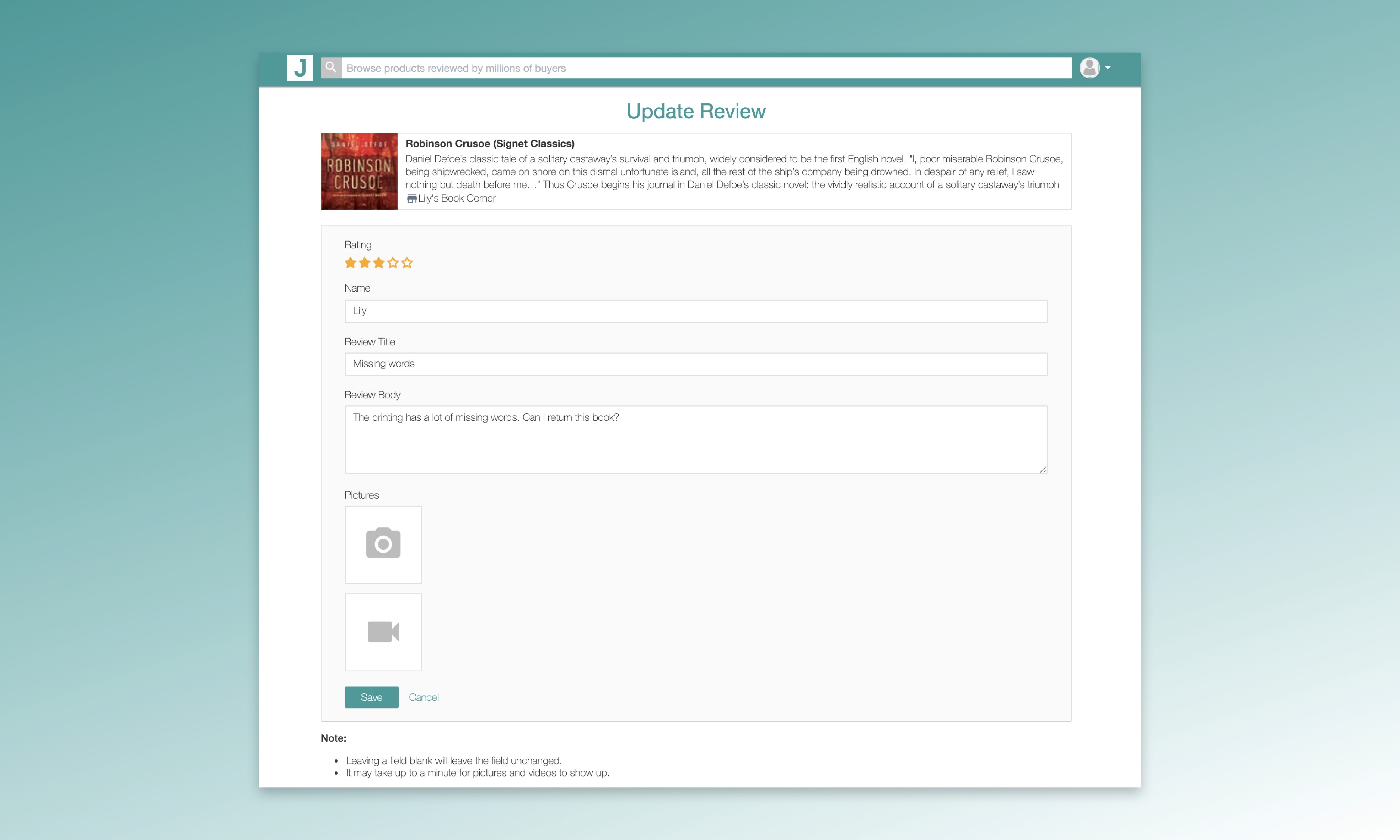
Your reviewers will receive an email with a link to a standalone form where they can update all the fields including review photos and videos. No login is required. You can customize the review update request email to make your message more relevant to each context, especially if you are dealing with unsatisfied customers.


You might be interested in
Everything you need to grow your store, all in one place
Why Judge.me
Platforms
For consumers
For security researchers
Company Registration Number: 12157706
Buckworths 2nd Floor, 1-3 Worship Street, London, England, EC2A 2AB
Copyright 2025 Judge.me Reviews
Why Judge.me
Platforms
For consumers
For security researchers
Company Registration Number: 12157706
Buckworths 2nd Floor, 1-3 Worship Street, London, England, EC2A 2AB
Copyright 2025 Judge.me Reviews
Why Judge.me
Platforms
For consumers
For security researchers
Company Registration Number: 12157706
Buckworths 2nd Floor, 1-3 Worship Street, London, England, EC2A 2AB
Copyright 2025 Judge.me Reviews
Why Judge.me
Platforms
For consumers
For security researchers
Company Registration Number: 12157706
Buckworths 2nd Floor, 1-3 Worship Street,
London, England, EC2A 2AB
Copyright 2025 Judge.me Reviews